Each bed and sleep log spans one night (or, if you are a vampire, a daytime sleep period). When adding or editing a sleep log, you categorize what happened from the time you first went to bed until the time you get up for the day. Napping during the day is NOT entered in your bed and sleep log; instead, you enter naps as a sleep-related activity.
After entering when you went to bed, you add log entries describing your night. For each entry you essentially answer the question, “And then what happened?”. Choose one of the options:
- In bed trying to fall to sleep
- In bed asleep
- In bed awake and active (e.g. screen time, reading, sex)
- Out of bed awake (e.g. getting up in the middle of the night to snack or use the toilet )
- Out of bed asleep (e.g. sleeping on the couch or recliner)
- Out of bed for the day (same as tapping on the Done button)
The first thing you do when adding a nightly sleep log is specify when you went to bed. Then choose an initial category (In bed and active or Trying to fall to sleep), plus how long this initial segment lasted. You cannot claim that you were instantly “in bed asleep”; My Sleep Tracker requires that you first indicate if you were “trying to fall to sleep” or “awake and active” for a minimum of one minute.
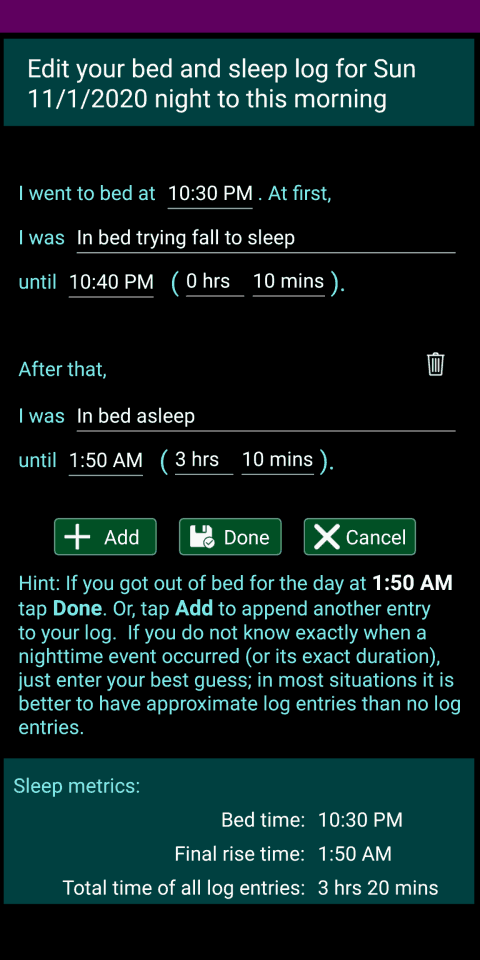
After that, tap the Add button and record what happened during the next segment of your night (e.g. you were in bed asleep or got out of bed) and how long that segment lasted. You can either specify when a segment of your night ended or how long the segment lasted. The segment’s end time and duration are two different ways of expressing the same thing. Changing one value automatically changes the other value. If you do not know exactly when a nighttime event occurred (or its exact duration), just enter your best guess; in most situations it is better to have approximate log entries than no log entries.
Repeatedly Add segments to your night log, until you have accounted for your entire night. Then, tap on the Done button to save your bed and sleep log information and return to the previous screen. Choosing “Out of bed for the day” from the list of categories is the same as tapping on the Done button.