When you open My Sleep Tracker, you are taken to the Home screen. If you haven’t entered your bed and sleep information for last night, Home
displays two big green buttons:

After you get up for the day, a good practice is to record your sleep for the previous night and your activities for the previous day. Don't wait too long, because research shows people do forget these details. My Sleep Tracker will allow you to add information only for the previous two days.
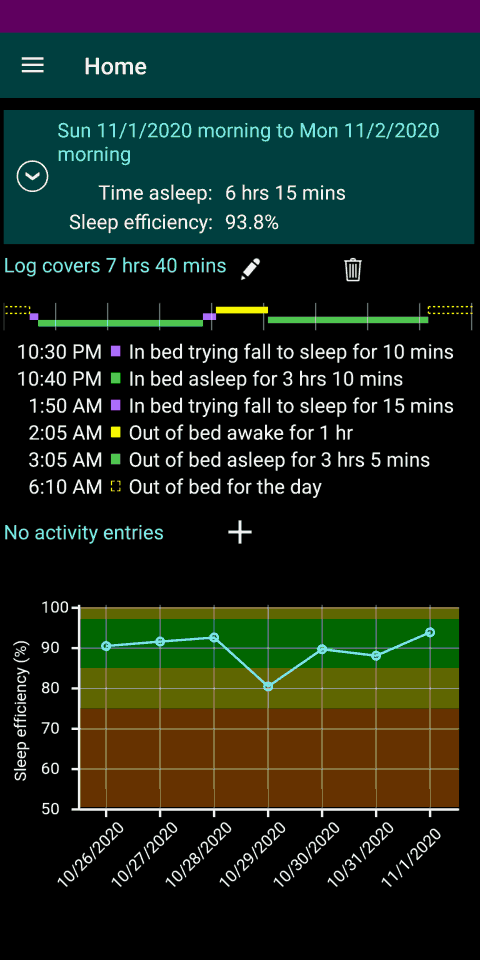
After you have entered bed and sleep information for last night, the big green buttons are no longer shown on the Home screen. Instead, the screen shows your entries (a.k.a. daily log) for the previous day and night.
Tap on the pencil icon to edit a log entry or tap in the trash can icon to delete an entry.
Once you have logged your sleep for one or more nights, a chart of your sleep efficiency for the previous week appears at the bottom of the Home screen. Sleep efficiency is an important metric used by sleep therapists; it describes the percentage of time you sleep during the night compared to how much time you spent in bed. To see other charts and metrics, use the main menu to navigate to the Sleep Analysis screen.
The Home screen only shows (and allows you to edit) data for the previous day. To view, add, delete, or edit data for other dates: select Daily Logs from the main menu.